
Code examples
1.1 the simplest RS232 only TX program
1.2 RS232 only TX Version 2
1.3 RS232 TX and RX
1.4 RS232 hex- and textmodus
1.5 RS232 draw received bytes
1.6 RS232 send one byte every second
1.7 RS232 ScanDevices opens max. 4 ports
2.1 RS232 connected to a Modem
2.2 RS232 - Modem LF detected
2.3 RS232 - Modem state_machine
2.4 GSM-MODEM terminal program
3.1 LPT1 read and write to parallel port
3.2 LPT: flashing light on parallel port
3.3 LPT: moving a stepper on parallel port
3.4 Load the driver GIVEIO
4 Exercises and training programs
5 View oscilloscope data
6 Hexdump a file
7 Plot HPGL - Dialog
8 Plot HPGL - SDI
if you are successful, send an email
if one program can be useful for you write
any problem or suggestion ?
orgler@tin.it
1.2 RS232 only TX Version 2
1.3 RS232 TX and RX
1.4 RS232 hex- and textmodus
1.5 RS232 draw received bytes
1.6 RS232 send one byte every second
1.7 RS232 ScanDevices opens max. 4 ports
2.1 RS232 connected to a Modem
2.2 RS232 - Modem LF detected
2.3 RS232 - Modem state_machine
2.4 GSM-MODEM terminal program
3.1 LPT1 read and write to parallel port
3.2 LPT: flashing light on parallel port
3.3 LPT: moving a stepper on parallel port
3.4 Load the driver GIVEIO
4 Exercises and training programs
5 View oscilloscope data
6 Hexdump a file
7 Plot HPGL - Dialog
8 Plot HPGL - SDI
if you are successful, send an email
if one program can be useful for you write
any problem or suggestion ?
orgler@tin.it

Create Your own MFC Dialog Project
Insert a EditControl and a Button
Add files serial.cpp and serial.h to your project
In the function OnInitDialog open the serial port
Adapt the variable iComPort to your port
If you have problems download the complete project
download source and EXE
The EXE is in the "Release" directory

add another button
add CR Carriage Return and LF Line Feed to the STRING
Send this string over RS232
If you have problems download the complete project
download source and EXE
The EXE is in the "Release" directory
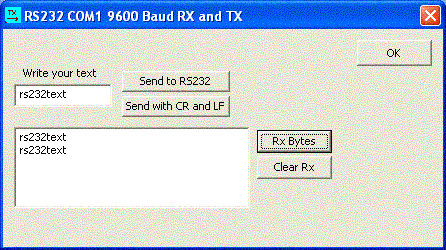
Now we use also the receiver routine from serial.cpp
Press the RX-button and read the contents of RS232 RX buffer.
If you need a more sofistcated receiver routine have a look to the next program.
download source and EXE
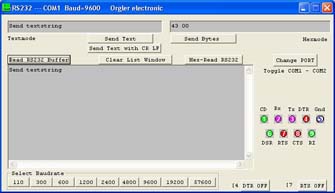
In this program you can change baudrate and toggle DTR and CTS line
download source and EXE
Compiled with Visual C++ 6.0

this program can be usefull if you have an embedded board and this board sends
one byte data like a temperature or other.
you can test this program also with "1.6 send one byte every second"
download source and EXE
Compiled with Visual C++ 6.0

You can connect two serial ports together on your PC to test this program
with the program "1.5 draw received byte"
download source and exe
Compiled with Visual C++ 6.0
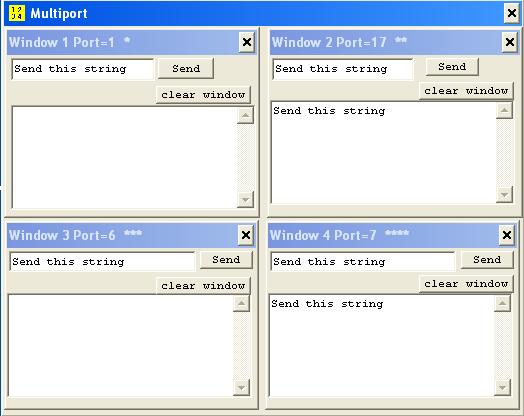
download source and exe for this 1+4 windows
the first window is a dialog window (parent) with 4 kind dialog windows
IDD_COM1, IDD_COM2, IDD_COM3, IDD_COM4
Serial4.cpp and Serial4.h
For every port we need a different handle

the kind windows needs 3 WM_MESSAGES:
 WM_INITDIALOG function OnInitDialog  (to start the timer)
 WM_TIMER      function OnTimer       (to read every 50 msec the COM port)
 WM_CLOSE      function OnClose        to kill the timer and to close COM port)
Compiled with Visual C++ 6.0
Send text data and receive text data from a modem.
download source with EXE
Compiled with Visual C++ 6.0
void CRs232aDlg::OnTimer(UINT nIDEvent)
{
unsigned char buf[500];
int xx,index;

  if(nIDEvent==1)
  {
   xx = ReadRs232Input(buf, COM1);
   if(xx)
   {
    index=0;
    while(xx--)  m_strEditRead += buf[index++];
    UpdateData(false);
   }
  }
 CDialog::OnTimer(nIDEvent);
}

There is a periodically readout of the input buffer of RS232 with a TIMER-Function.
Send text data and receive text data from a modem with LF detect.
download source with EXE
Compiled with Visual C++ 6.0
void CRs232aDlg::OnTimer(UINT nIDEvent)
{
unsigned char buf[500];
int xx,index;

  if(nIDEvent==1)
  {
   xx = ReadRs232Input(buf, COM1);
   if(xx)
   {
   index=0;

    while(xx--) {  m_strEditRead   += buf[index];
                   RxBuffer[iRxIndex++] = buf[index];
                   if(buf[index] == LF) LineFeedDetected();
                   index++;
                }


        UpdateData(false);
   }
  }
 CDialog::OnTimer(nIDEvent);
}

void CRs232aDlg::LineFeedDetected()
{
CString str;
RxBuffer[iRxIndex]=0;  // end of string; now you can evaluate this string
iRxIndex=0;

str.Format("LineFeed%c%c",CR,LF);
m_strEditRead += str;
}
There is a periodically readout of the input buffer of RS232 with a TIMER-Function.
In the function "LineFeedDetected()" you can evaluate the content of RxBuffer
download source with EXE
Compiled with Visual C++ 6.0
 |
To control a Modem we need automatics steps.
One solution is a state machine.
This is an example with six states.
Send ATZ with CarriageReturn and LineFeed, the modem answers with ATZ CR LF followed with OK CR LF. Every time we receive a LF the input string is checked. |


download the EXE
download the driver GIVEIO.SYS
download the complete C-sourcefiles
Compiled with Visual C++ 6.0
The driver GIVEIO.SYS must be in the root directory c:\
to install this driver you must have administrator rigths
if you have an error in attempt to write to LPT restart the program
The output byte toggles only from 0xAA to 0x55

download the EXE and source
download the complete C-sourcefiles
Compiled with Visual C++ 6.0
The driver GIVEIO.SYS must be in the root directory c:\
to install this driver you must have administrator rigths

download the EXE and source
download the complete C-sourcefiles
Compiled with Visual C++ 6.0
The driver GIVEIO.SYS must be in the root directory c:\
to install this driver you must have administrator rigths
Exercises to learn hex and binary arithmetic
The programs can print a DINA4 page with exercises without solutions,
Pressing the button “F” the solutions are displayed.
If you have 20 students the values for every student are different.
Try it out and give me a feedback.
You can download only the EXE or the complete source files
EXE-FILE: BITCHANGE.ZIP Sourcefile: bitchange.zip
EXE-FILE: BINHEX.ZIP Sourcefile: binhex.zip
Compiled with Visual C++ 6.0